n8n is an open-source, self-hostable workflow automation platform that allows businesses to connect applications, automate repetitive processes, and build AI-powered workflows using a visual node-based editor, without requiring code for most use cases.
In 2026, n8n has become one of the most widely adopted automation tools for businesses that need the flexibility of code-level customization combined with the accessibility of a no-code interface. It is used by startups, SMBs, enterprises, and development teams to automate everything from CRM updates to complex AI agent pipelines.
This guide explains what n8n is, how it works, and why it has become the automation platform of choice for AI-enabled businesses.
What Is n8n?
n8n (pronounced “n-eight-n,” short for “nodemation”) is a workflow automation tool that connects different apps and services through a visual workflow builder. Each workflow is made up of nodes, individual building blocks representing triggers (what starts the workflow) and actions (what the workflow does).
Key characteristics of n8n:
- Open-source: free to self-host; paid cloud version available
- Visual workflow editor: drag-and-drop interface accessible to non-developers
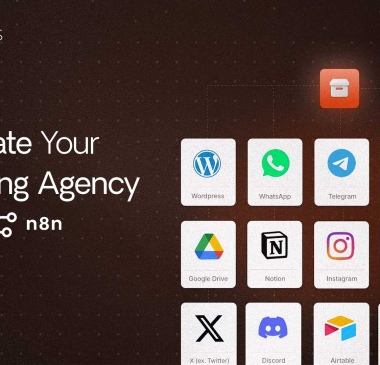
- 400+ integrations: built-in connections to common apps (Gmail, Slack, Airtable, HubSpot, Shopify, OpenAI, etc.)
- AI Agent native: built-in LangChain integration for building AI agents
- Custom code support: JavaScript and Python nodes for logic that goes beyond built-in nodes
- Webhook support: receive data from any platform in real time
How Does n8n Work?
Every n8n workflow follows the same pattern:
1. Trigger → Something happens (a new email arrives, a form is submitted, a scheduled time is reached, a webhook is received)
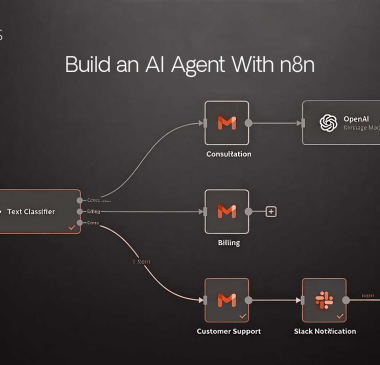
2. Nodes → The workflow processes that trigger through a series of connected nodes (fetch data, transform it, send it somewhere, run an AI model on it, post a notification, etc.)
3. Output → The result (a record is created in your CRM, an email is sent, a Slack message is posted, a document is generated, an AI response is delivered)
A Simple Example: Lead Capture Automation
Trigger: A new contact submits a form on your website → Node 1: Look up the contact in HubSpot → Node 2: If the contact doesn’t exist, create a new HubSpot contact → Node 3: Send a welcome email via Gmail with personalized content → Node 4: Post a notification to the #sales-leads Slack channel → Node 5: Add the lead to an Airtable CRM tracker
This entire workflow runs automatically, every time, in under 10 seconds, without any human involvement.
n8n vs. Zapier vs. Make: Which Should You Use?
| n8n | Zapier | Make (Integromat) | |
| Pricing model | Open source (free self-hosted) | Per-task pricing | Per-operation pricing |
| AI Agent capability | Native, powerful | Limited | Moderate |
| Technical requirement | Low-medium | Very low | Low |
| Self-hosting option | Yes | No | No |
| Custom code | JavaScript + Python | Limited | Limited |
| Integrations | 400+ | 5,000+ | 1,000+ |
| Best for | Technical teams, AI workflows, cost control | Non-technical users, simple automations | Mid-complexity workflows |
Choose n8n if: You want full control, need AI agent capabilities, want to avoid per-task fees at scale, or have developers who can configure custom logic.
Choose Zapier if: You need an integration n8n doesn’t have and you value simplicity over cost efficiency.
n8n in 2026: AI Agent Workflows
The most powerful use of n8n in 2026 is not just connecting apps; it’s building AI agents: automated systems that can think, decide, search, and act without human input.
n8n’s native LangChain integration allows you to build AI agent workflows that:
- Receive a question or trigger
- Search a knowledge base or the web for relevant information
- Run that information through an LLM (OpenAI, Claude, Gemini, etc.)
- Generate a structured response
- Take an action based on that response (update a CRM, send an email, create a document)
This is the foundation of the AI-powered automation that is replacing significant portions of routine knowledge work in 2026.
Most Common n8n Use Cases for Businesses
- Lead qualification and CRM enrichment: Auto-enrich leads with company data, assign scores, and route to the right sales rep
- Customer support automation: Route support tickets, generate AI draft responses, escalate complex issues
- Social media management: Auto-schedule content, monitor mentions, aggregate performance data
- Invoice and billing automation: Generate invoices from project management data, send payment reminders
- Report generation: Pull data from multiple sources, compile into formatted reports, distribute automatically
- AI content pipelines: Research → outline → draft → SEO optimize → publish sequences
How Robiz Solutions Uses n8n for Client Automation
At Robiz Solutions, our AI Agency services include building custom n8n automation workflows for clients across marketing, operations, and customer service. We design, build, and maintain automation pipelines that eliminate manual work and scale client operations without proportional headcount growth.
Our Tech & Digital Engineering team handles complex n8n configurations including AI agent builds, API integrations, and custom JavaScript logic, delivering workflows that go beyond what standard no-code tools can achieve.
Contact Robiz Solutions to discuss what your business can automate with n8n.
Questions About n8n
n8n is free to self-host, you pay only for your server costs. The cloud-hosted version (n8n.io) offers a free tier with limited executions and paid plans starting from approximately $20/month.
No, most workflows can be built using n8n’s visual editor without code. For advanced logic (custom data transformations, complex conditionals, external API calls), JavaScript knowledge is helpful but not required for the majority of use cases.
The key differences are pricing model (n8n is self-hosted and open-source; Zapier charges per task), AI agent capability (n8n has native AI agent/LangChain support; Zapier’s AI capabilities are more limited), and technical depth (n8n supports custom code; Zapier is more constrained but easier for beginners).
n8n has 400+ built-in integrations and supports generic HTTP request nodes for any REST API. Virtually any application with an API can be connected to n8n.
A standard automation follows a fixed sequence: if A, then B. An AI agent can reason, make decisions, choose between multiple paths, search for information, and adapt based on context, making it suitable for tasks that require judgment, not just execution.
Yes. n8n is used by enterprises including Delivery Hero and large SaaS companies for high-volume automation. Enterprise deployments typically self-host for data security and use the n8n enterprise license for advanced features.
Start with n8n’s cloud trial at n8n.io. Explore the template library for pre-built workflows in your use case. Begin with a simple 3-node workflow before building complexity. The n8n community forum and documentation are extensive resources.
Published by Robiz Solutions – robizsolutions.com